
RenewCMS is now in public beta: a self-hosted headless CMS for writing articles, shaping structured content and delivering it to a frontend you choose. It brings a Go REST API and an embedded Vue 3 workspace together in one executable, so editors and the content API live in one place.
Good content. On your terms.
The idea is straightforward. Give writers a calm, capable place to work. Give developers a clear API and room to build their own public experience. Keep the content and the infrastructure under your control.
RenewCMS: a self-hosted CMS for writing, structured content and your own frontend.
A workspace for the writing
Articles start as drafts. The editor keeps the story in front of you while letting you choose its site and authors, add images, and review search and social previews. SEO suggestions can help catch missing or incomplete details, but they do not block publication. When an article is ready, a person with permission can publish it.
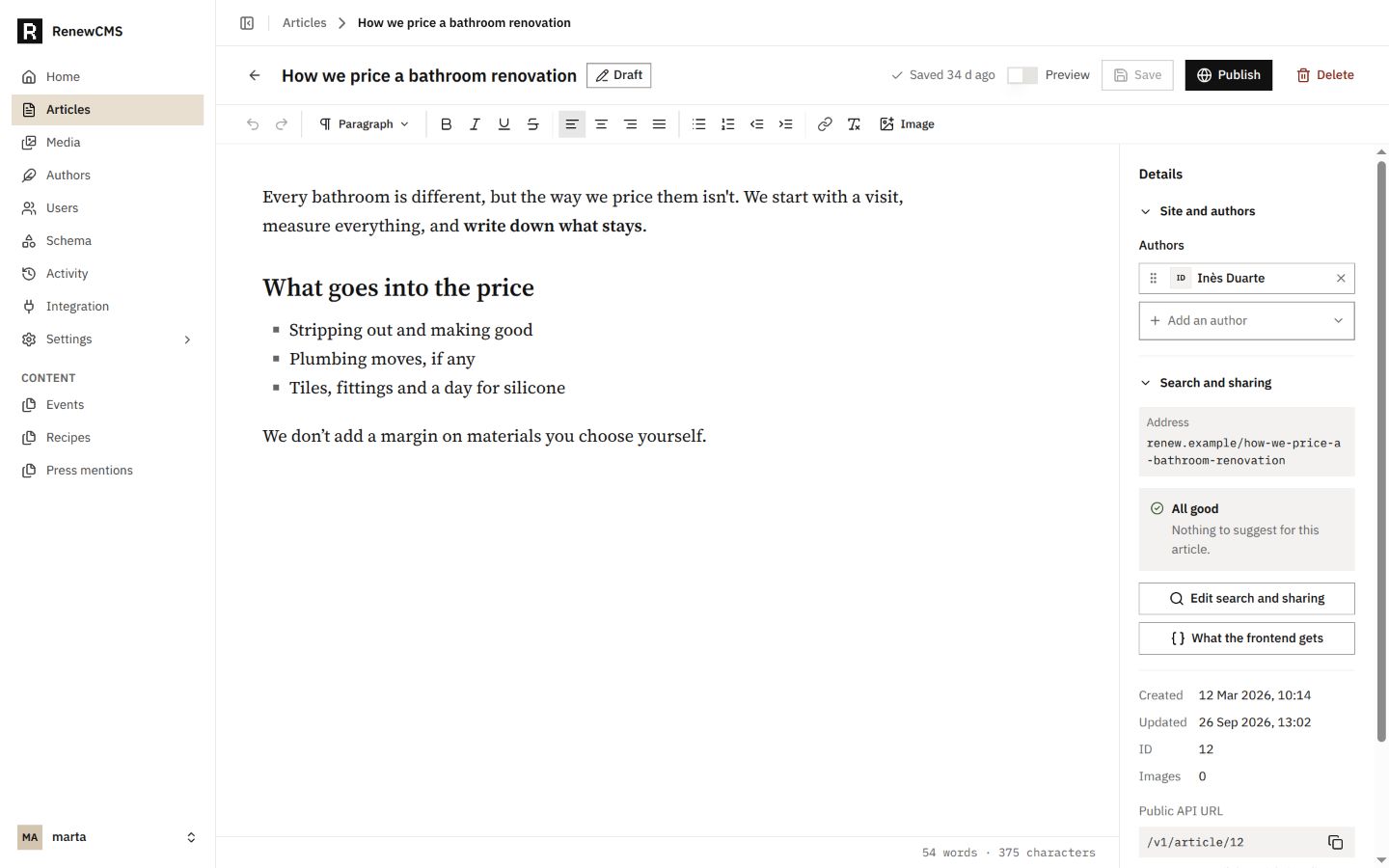
The article editor brings writing, attribution, publishing and search details into one workspace.
Articles are stored as HTML and can be delivered through the API as Markdown, HTML or structured JSON blocks. That lets a frontend choose the rendering approach that fits its stack, while keeping the editorial source in one place.
Structure beyond articles
Many projects also need content that is more structured than a story. RenewCMS lets an administrator define custom content types, arrange their fields and use the generated forms to manage entries. The available field types include text, rich text, number, yes or no, date, choice, media and relation. Relations connect entries across content types, while media fields point into the shared image library.
Schema changes are checked against existing entries before they are saved. That makes the shape of a collection visible and reviewable instead of burying it in frontend code or an opaque data model.
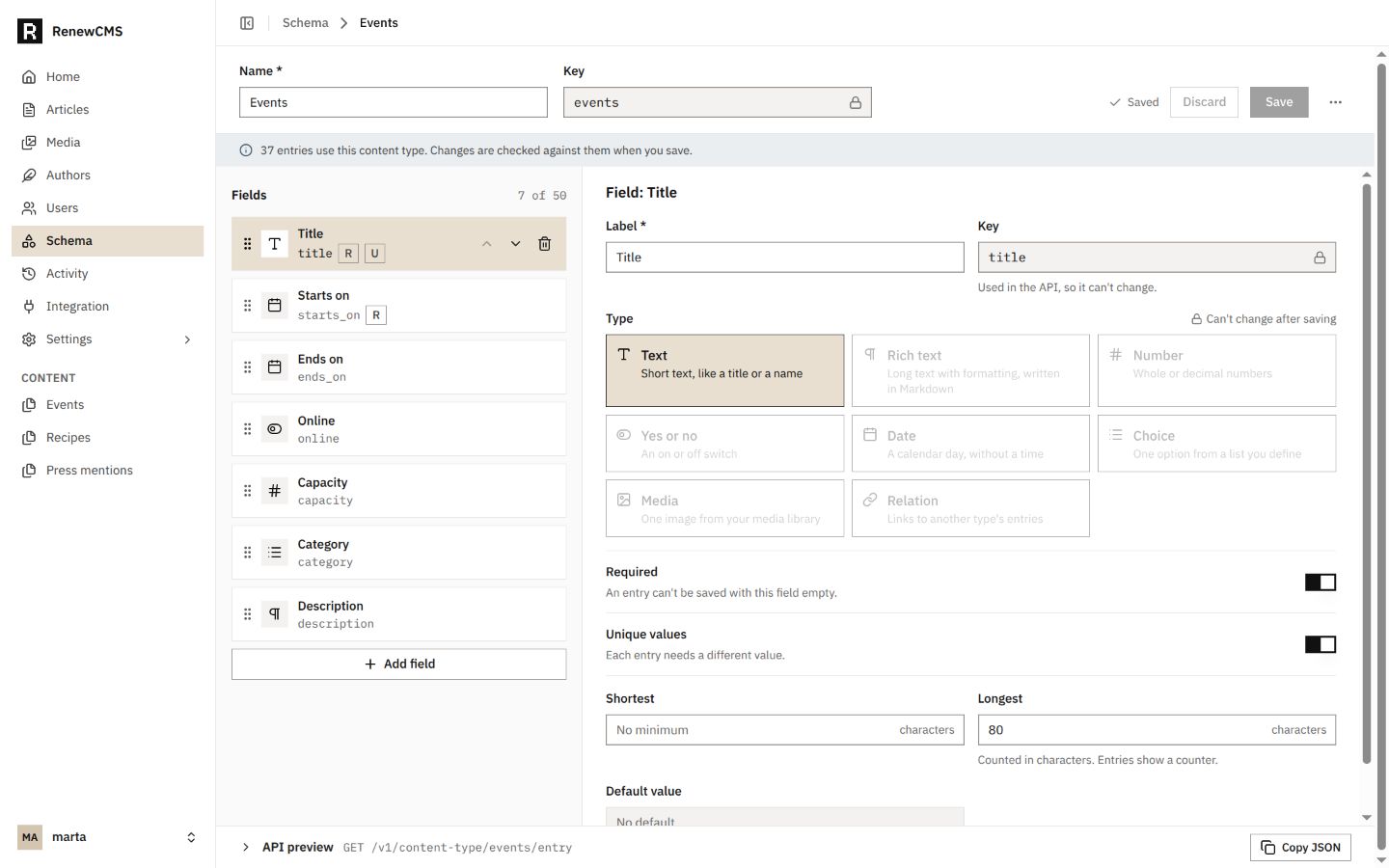
A custom Events type, with its fields visible and existing entries considered when the schema changes.
The same library can serve images in articles and structured entries. Named image variants are generated on demand and cached; the original image stays untouched. The workspace also helps you see where an image is used, merge duplicate uploads and manage the variant cache.
Connect it to the frontend you want
RenewCMS is headless: it manages content and serves it through a REST API, while you build and host the public website or application separately. Your frontend owns its routes, layouts, rendering and deployment. It can request article content in the format it prefers and use resolved canonical, Open Graph, Twitter card and Article JSON-LD data when assembling page metadata.
Each instance serves version-matched API documentation, including OpenAPI 3.1, as well as LLM-readable documentation. A separate optional MCP executable is available for compatible clients that can launch stdio servers; it exposes selected article, media and SEO actions through the same HTTP API. MCP is an optional integration, not a hosted service.
API keys act with the current permissions of their creator, so keep them on trusted servers. A key should only be created by an account whose role has the access the integration needs.
Keep the stack small and understandable
A release bundles the Go API and Vue workspace into one executable. You can also run RenewCMS with Docker. SQLite and local image files are the straightforward defaults; PostgreSQL, MySQL or MariaDB and S3-compatible object storage are available when your setup calls for them. Go, Node.js and Bun are development tools for building from source, not runtime requirements for a release.
Your deployment still needs the usual care: a public URL, HTTPS, email settings for account messages, and a backup plan that protects both the database and uploaded media. RenewCMS does not host or deploy the frontend for you, and a database backup alone does not include images stored separately.
Give each person the right access
RenewCMS includes Owner, Admin and Writer roles, and lets administrators create custom roles. Content permissions can be set by type with None, Own or All scope. Writing and publishing are separate permissions, so a contributor can prepare work without receiving the ability to make it public.
An activity trail records content, media and access changes. You can filter events, export them as CSV and set how long activity is retained. One instance can also manage more than one site, with separate site settings and author profiles, which can help when several frontends share an editorial workspace.
What public beta means
RenewCMS is actively under development. Some features may be incomplete or not fully tested, and behavior can change between releases. The beta is an invitation to evaluate the current version against your own workflow, explore the documentation and share useful feedback. It is not a promise of hosted service, uptime or a finished production release.
Before adopting it for important content, read the setup and upgrade guidance, keep backups of both your database and media, and decide whether the current feature set fits your needs.
Try the public beta
Start with the RenewCMS releases and follow the getting started guide. Choose a binary or Docker, configure the public URL, a strong JWT secret and SMTP for account emails, then create and verify the first account. Put HTTPS in front of a production deployment and back up both the database and its media.
The project documentation covers configuration, Docker, deployment, backups, the API and the current limits of the beta. If you try RenewCMS, feedback and issue reports help make the next release better.
RenewCMS is for people who want an editorial workspace without giving up control of their content stack: write in one place, model what your project needs, and build the public experience your way.